


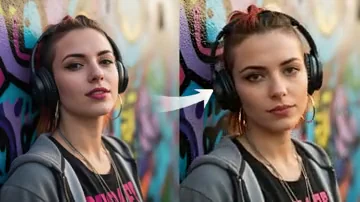


“Background cleanup that used to consume an evening can now become the first fast step in our product workflow.”
Powerful AI Tools for Everyone
All your AI creative
All your AI creative
tools, in one place.
One clean place for image, video, business, creative and everyday tools — organized around what people want to do, not around model names.
TOOL67
67
Creative Engine
Popular Tools
Start with what others love. Fast, simple, and powerful.
1M+Happy Creators
500+AI Tools
190+Countries
4.9/5User Rating
My Favorite Tools
Fast text shortcuts to the tools you use most.
IMAGE WORKFLOWS
All image tools →Image tools.
VIDEO WORKFLOWS
All video tools →Video tools.
Generate, enhance, remix or rebuild a video through a focused workflow.
QUICK ACCESS
View everything →Useful tools.
Fast text-only links for practical edits and repeat tasks.
Age EditorAI Photo RestorationBackground RemoverBackground ReplaceBag EditorBeard EditorBokeh BackgroundCar PaintCar StudioClothing ChangeEye EditorFace EditorFace RestoreFloor MaterialFood LightingFood StylingGlasses EditorGolden HourHat EditorImage EnhancerImage UpscalerInterior LightingJawline EditorJewelry EditorMakeup EditorMakeup Editor ProNose EditorObject RemoverOld Photo RestorePlate ChangePortrait LightingProduct BackgroundProduct Color GradingProduct ReflectionProduct RetouchProduct ShadowRoom CleanupSkin RetouchSmile EditorTattoo EditorTeeth EditorWall ColorWatch EditorWheel EditorWindow TintClothes ChangerClothes Changer ProPoster Maker
INDEX GALLERY
Explore what the workflows can make.
The existing index-gallery remains in the middle of the homepage, mixing image and video work in one visual stream.
ONE IDEA, MANY OUTPUTS
Build a workflow instead of starting over.
Create a frame, improve it, animate it and continue into a specialized product, portrait or video tool.
FROM THE WORKFLOW
Customers’ Feedback about Tool67.
Focused tools help people get to a useful first result without opening a full production suite for every small task.
“Tool67 is useful when a large batch needs a solid first pass before detailed manual finishing.”
“The video background workflow removes a repetitive editing step and gives me a much faster starting point.”
“I use the tools for announcements, flyers and video assets without opening a heavy editor for every small job.”
“The product and design tools help me test more ideas quickly when custom orders arrive together.”
“Simple tools are valuable when a team needs quick background or image adjustments without a long learning curve.”
TRUSTED BY 25K+ BUSINESSES
Used alongside the tools creative teams already know.
From independent sellers to photographers, agencies and content teams, Tool67 fits into practical visual workflows.


FAQ
Frequently Asked Questions.
What is Tool67?
Tool67 is a collection of focused AI image, video, product and portrait tools. Each page is built around one clear result, so you can start with the workflow that matches the job.
Which tool should I start with?
Start from the result you need. Use Text 2 Image for a new visual, Image 2 Image for a transformation, Image 2 Video for motion, Product Staging for commercial scenes, or one of the specialized portrait and editing tools.
Do I need design or video-editing experience?
No advanced editing experience is required for the core workflows. Clear source images and short, specific directions usually give the tool a better starting point.
Are all tools free?
Some utilities are free, while AI generation and heavier processing may require sign-in or credits. Each tool page should show its current requirements before processing begins.
Where are my favorite and recent tools?
When signed in, your saved tools and recently used tools appear near the top of the homepage as clean text shortcuts. The complete list remains available in your account workspace.
Where are completed images and videos saved?
Supported generation workflows can save completed media to My Images or My Videos. Availability depends on the tool and whether you are signed in.
Can I use the results commercially?
Commercial use depends on your Tool67 plan, the selected model or service terms, the rights to your uploaded material and applicable laws. Review logos, text, products and identifiable people before publishing.
How long does generation take?
Simple image operations may complete quickly. AI image and video generation can take several minutes depending on the model, file size, scene complexity and queue.
What kind of source material works best?
Use clear, well-lit files with a visible subject and enough resolution for the requested edit. Extreme blur, heavy compression, tiny faces, overlapping subjects and missing details can reduce consistency.
How are uploaded files handled?
Uploaded files are handled according to Tool67’s current privacy, storage and deletion workflow. Review the site privacy policy before uploading sensitive personal, client or commercial media.